Phoenix Setup
BODY END HTML
<script src="https://zauaewebmanager.z8.web.core.windows.net/scripts/sliders/bxslider/jquery.bxslider.min.js"></script>
<script>
$('<svg data-name="Layer 1" xmlns="http://www.w3.org/2000/svg" class="svgArrowTopL" viewBox="0 0 1200 120" preserveAspectRatio="none"><path d="M1200 0L0 0 892.25 114.72 1200 0z" class="shape-fill"></path></svg>').appendTo('.arrowTopL');
$('<svg data-name="Layer 1" xmlns="http://www.w3.org/2000/svg" class="svgArrowBtmL" viewBox="0 0 1200 120" preserveAspectRatio="none"><path d="M892.25 114.72L0 0 0 120 1200 120 1200 0 892.25 114.72z" class="shape-fill"></path></svg>').appendTo('.arrowBtmL');
$('<svg data-name="Layer 1" xmlns="http://www.w3.org/2000/svg" class="svgArrowTopR" viewBox="0 0 1200 120" preserveAspectRatio="none"><path d="M1200 0L0 0 892.25 114.72 1200 0z" class="shape-fill"></path></svg>').appendTo('.arrowTopR');
$('<svg data-name="Layer 1" xmlns="http://www.w3.org/2000/svg" class="svgArrowBtmR" viewBox="0 0 1200 120" preserveAspectRatio="none"><path d="M892.25 114.72L0 0 0 120 1200 120 1200 0 892.25 114.72z" class="shape-fill"></path></svg>').appendTo('.arrowBtmR');
</script>
HEAD HTML
<link rel="stylesheet" href="https://use.fontawesome.com/releases/v5.7.1/css/all.css" integrity="sha384-fnmOCqbTlWIlj8LyTjo7mOUStjsKC4pOpQbqyi7RrhN7udi9RwhKkMHpvLbHG9Sr" crossorigin="anonymous"/>
SITES.CSS
Things to note in the CSS.
- The default background of the demo is
#f3f3f3 so there are references "ANGLE TOP..." & "ANGLE BOTTOM..." to that in the angle CSS, either change the background of the site to
#f3f3f3 or change the CSS to
#ffffff if the background is white etc.
- Add the "u_########" number of the image header ROW to the classes under "BACKGROUND COLOUR OF ANGLES UNDER VIDEO HEADER"
- If you have a dark header for Phoenix, uncomment the CSS "CUSTOM HEADER ANGLE COLOUR" to change the colour of the angle below the header.
- Internal Page: There is a CSS section "HIDE INTERNAL HEADER FROM HOME" for hiding the inner head divider once it's added into the head.
/* GLOBAL SITE CSS - ADD CSS TO AFFECT THE WHOLE SITE */
@media screen and (min-width:1200px) {
.rows-1200 .dmRespDesignRow, .rows-1200 .dmRespRow:not(.fullBleedMode) .dmRespColsWrapper { max-width: 1500px }
}
/* FIX FOOTER BUTTON PADDING */
#dm .dmFooterContainer .dmform .dmformsubmit { margin: 0px 15px; }
*#dm div.dmNewParagraph a,
*#dm div.dmCustomHtml a,
*#dm div.dmBlockElement a { text-decoration: none !important; font-weight: 700 !important; -webkit-transition: color 0.4s ease-in !important; -o-transition: color 0.4s ease-in !important; outline: 0 !important; }
*#dm div.dmCustomHtml a:hover,
*#dm div.dmNewParagraph a:hover,
*#dm div.dmBlockElement a:hover { color:#06B7E0 !important; text-decoration: none !important; font-weight: 700 !important; }
/* BLOG WIDGET PADDING */
#dm [list-layout=layout4][text-box-padding=true] .postArticle .postText { padding: 30px 30px 0 30px !important; }
#dm [blog-posts-feature-flag=true][text-box-padding=true]:not([list-layout=list_slider]) .postTextContainer .readMore { padding: 15px 30px 30px 30px !important; }
/* ANGLE TOP - CHANGE SHAPE-FILL TO BACKGROUND COLOUR */
.svgArrowTopR { position: absolute; display: block; width:100%; height: 30px; left:0; top: 0px; }
.svgArrowTopR .shape-fill { fill: #f3f3f3; }
.svgArrowTopL { position: absolute; display: block; width:100%; height: 30px; left:0; top: 0px; transform: rotateY(180deg); }
.svgArrowTopL .shape-fill { fill: #f3f3f3; }
/* ANGLE BOTTOM - CHANGE SHAPE-FILL TO BACKGROUND COLOUR */
.svgArrowBtmL { position: absolute; display: block; width:100%; height: 30px; left:0; bottom: -1px; transform: rotateY(180deg); }
.svgArrowBtmL .shape-fill { fill: #f3f3f3; }
.svgArrowBtmR { position: absolute; display: block; width:100%; height: 30px; left:0; bottom: -1px; }
.svgArrowBtmR .shape-fill { fill: #f3f3f3; }
/* BACKGROUND COLOUR OF ANGLES UNDER VIDEO HEADER */
.u_######## .svgArrowBtmR .shape-fill { fill: #418696; }
.u_######## .svgArrowBtmL .shape-fill { fill: #418696; }
/* CUSTOM WAVE COLOUR BETWEEN TWO COLOURED SECTIONS
.u_######## .svgArrowTopR .shape-fill { fill: #000000; }
.u_######## .svgArrowTopL .shape-fill { fill: #000000; }
.u_######## .svgArrowBtmR .shape-fill { fill: #000000; }
.u_######## .svgArrowBtmL .shape-fill { fill: #000000; }
*/
/* CUSTOM HEADER ANGLE COLOUR
.dmHeaderContainer .svgArrowTopL .shape-fill,
.dmHeaderContainer .svgArrowtopR .shape-fill { fill:#000000; } */
/* HIDE INTERNAL HEADER FROM HOME */
#dm .dm-layout-home .u_########## { display:none; }
/* OVERLAP HOME HEADER
#dm .dm-layout-home .dmHeaderContainer { position: absolute; z-index: 101; width: 100%; }*/
Header
- NOTE: There are two header rows, one with the logo/navigation and the row below is the angle.
- Change the background of the header to transparent. (by default its white)
- Lock the header row, not the whole header because we want to allow the client to change the internal divider.
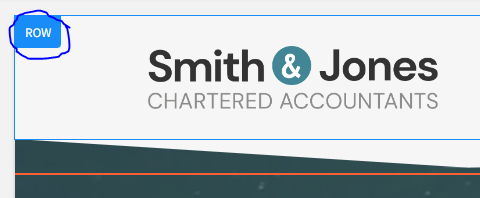
- After you have both ROWs in the header then un-comment the CSS with the heading "OVERLAP HOME HEADER" to allow it to float over the video.
Internal Header
Once you have imported the internal page, move the divider image into the header, set the top margin of the divider row to -50px (negative 50px)
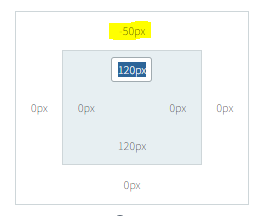
Once you have done that find the "u_#########" class on the image divider row and add it to the SITE.CSS file where is already setup "HIDE INTERNAL HEADER FROM HOME"
Add appropriate overlay colour
Change Static Image to a Video
Pick something from the video library you think will suit, and add overlay.
Alternate Footer Options
Delete the alternate map based on the clients instructions.
Heading Sizes
- H1 - 50
- H2 - 40
- H3 - 30
- H4 - 20
Internal Page Menu
If the pages are applicable (e.g. if they exist and/or have sub-menu items) copy the "Side Navigation" from the internal page section and add it into:
- Firm Profile
- Firm Profile > Join Our Team
- Firm Profile > Join Our Team > Apply Online
- All sub pages under Resources
Custom Contact Layout
Change the layout of the "Contact Details" page to match the demo.
Adding Waves to Rows
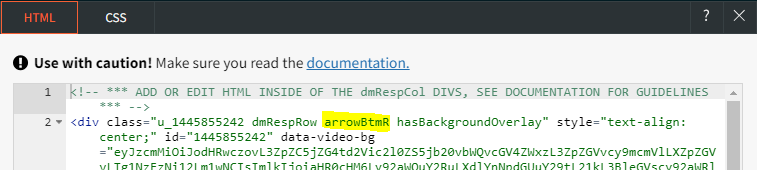
To add waves to other rows: Go into the ROW CSS/HTML and add the class:
- arrowTopR - Angle Top - Short side on right
- arrowTopL - Angle Top - Short side on left
- arrowBtmR - Angle Bottom - Short side on right
- arrowBtmL - Angle Bottom - Short side on left