
Notepad ++ for XML Feeds
STEP 1 - OPEN NOTEPAD ++
- Open Notepad ++
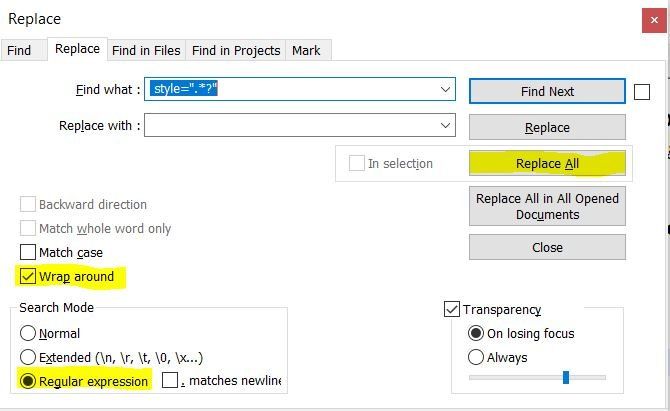
- Press Ctrl - H
- Select "Wrap around" & "Regular expression"
STEP 2 - REGULAR EXPRESSIONS
Add the three lines below to "Find what" and leave "Replace with" blank.
NOTE: When selecting the text below make sure you highlight and select the blank space before.
style=".*?"
class=".*?"
id=".*?"
STEP 3 - OTHER REPLACMENTS
- Open "Find and replace" again "Ctrl - H"
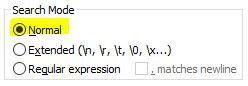
- Set "Search Mode" to "Normal"
Add the lines below to
"Find what" and leave
"Replace with" blank.
- <p></p>
- <span></span>
- <span> </span>
- <strong></strong>
- <p><b></b></p>
- <p><strong></strong></p>
- <p>&nbsp;</p>
- <h1></h1>
- <h2></h2>
- <h3></h3>
STEP 4 - CHECK FOR DIVS
- Do a search (Ctrl - F) for <div
- If you find any in the XML file do open a find and replace "Ctrl - H"
- Change "Search Mode" to "Normal"
- Do a
"Find what" for
<div and the "Replace what" for
<p
This will replace any opening div tags and replace them as a p tag. - Do a
"Find what" for
</div and the
"Replace what" for
</p
This will replace the closing div tag and make it a closing p tag.
STEP 5 - RUN VALIDATOR
Run the following before you run either validation RSS Validator or W3C Validator:
VALIDATOR ERRORS - ATTRIBUTE
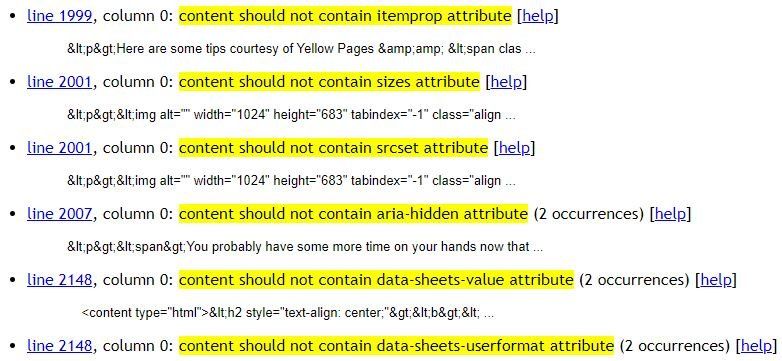
When you get the results from the validator, if there are "attribute" tags you will need to find the tag by clicking the line (example in the screen shot below line 1999 etc) and delete the "attribute" tag.
OTHER ISSUES TO NOTE
Issue found with the length of author tag:
- I had an import issue with the character length of the <author> tag at the top of the feed.